
3D window configurator for manufacturers, fabricators and dealer networks
3D window configurators for manufacturers.
We specialize in complex products. Configurix builds your window configurator and custom factory software around openings, profiles, sashes, glass and hardware. Keep product rules, account prices, quotes and accepted specifications connected.
Discuss your product range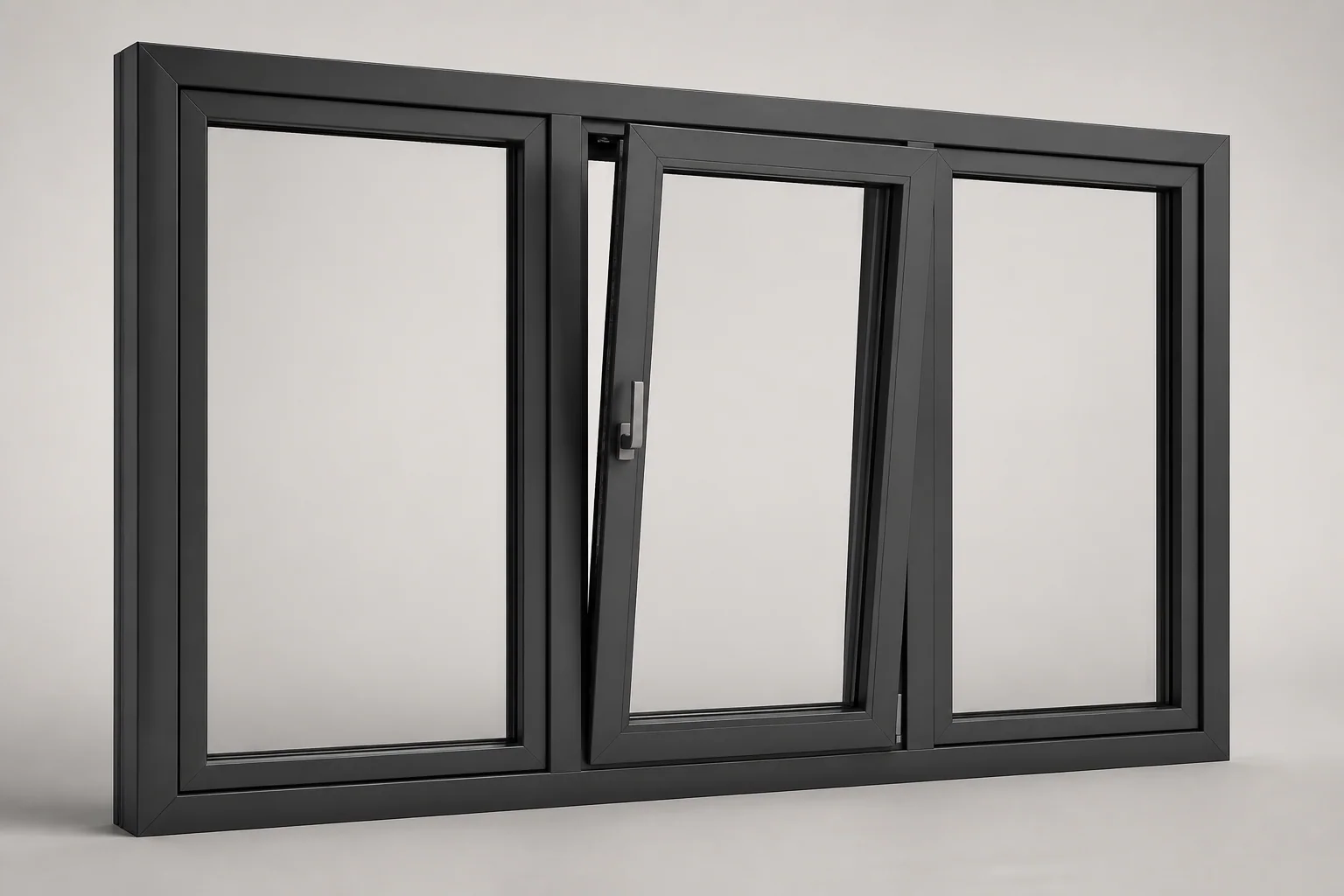
- Frame profiles
- Sashes and glazing
- Hardware and seals
Your catalogue, easier to configure.
Frame and opening geometry
Guide the buyer through the systems and dimensions that can actually be supplied.
Sashes and handing
Keep every light and opening action clear from both sides of the window.
Glazing and performance
Present approved glass and specification packages for the selected system.
Hardware and accessories
Connect visible details and required components to the configured sash.
Pricing and sales channels
Use one product model across self-service and assisted selling.
Schedules and system data
Preserve every approved window beyond the sales screen.
Custom software for manufacturers
A configurator up front. Your business connected behind it.
Keep the selected product connected to the customer, appointments, quotes, materials and the agreed production handoff. We build the workflow around your catalogue and the systems your team uses.
CRM and qualified leads
Store the opening layout, dimensions, profile system, glazing and hardware with each enquiry and its qualification and follow-up.
New enquiry
Configured window
Product fitQualified
Configured window
RequirementsProposal
Configured window
Next actionCalendars and appointments
Let a configured project continue into a sales consultation, technical review, survey or installation appointment. Connect calendars, responsibilities and reminders to the same customer record.
- 09:00Project review
- 11:30Technical review
- 14:00Production planning
Bill of materials and factory data
Relate the accepted frame, sash, glass, seals and hardware to your part codes, quantities and manufacturing checks before the agreed handoff.
| Component | Quantity |
|---|---|
| FRM-01Frame profiles | 1 |
| PNL-02Sashes and glazing | 1 |
| KIT-03Hardware and seals | 1 |
Mapped to your product codes
Live prices and branded quotes
Apply your own formulas, price lists, dealer margins and approval rules. Generate a quote containing the saved specification, product images, commercial terms and a clear customer approval step.
Quote revision
Orders, jobs and production
Carry accepted choices into order lines and assigned jobs. Keep product revisions, required approvals, documents and delivery tasks together so sales and the factory work from the same specification.
- Accepted quote01
- Configured order02
- Production job03
- Installation04
Invoicing and accounting
Connect accepted orders to deposits, invoice drafts, payment terms and your accounting workflow. Agree which system issues the invoice and how references and confirmed payment status return to the project.
Configured window
Built for your website. Connected to your systems.
Launch a branded configurator in your existing website or a custom sales portal. Connect CRM, ERP, PIM, ecommerce, calendars and accounting through available APIs, webhooks or agreed imports. We define the data, permissions and responsibilities for each connection with your team.
- 01Your website
- 02Configurator
- 03CRM & calendar
- 04ERP & accounting
Choose the workflows your implementation needs. We build and validate them against your products, documents and target systems.
Plan your manufacturing configuratorBuild the platform around your products.
Bring your catalogue, pricing rules and required outputs. We’ll define your configurator, sales workflow and custom factory software around the way your business works.
Questions and answers
Catalogue rules and technical details
Window configuration software defined
A window is geometry, performance, hardware and installation context.
Configurix connects made-to-measure frame geometry, sash layouts, handing, glazing, hardware, sills, screens and shutters in one guided 3D project—with live account pricing, branded quotes, window schedules and optional order data connected to every item.
Window configuration starts with the opening, but the sale depends on a complete system. Frame family, sash layout, mullions, transoms, handing, glazing, hardware, sill, vents, screens, shutters and installation options must remain compatible as dimensions change.
A manufacturer-focused configurator represents those relationships as one structured item. When a user changes the width, opening type or glass package, the elevation, rules, price and window schedule can respond together instead of leaving sales to reconcile a sketch, price matrix and order form.
Configurix can use the same governed catalogue across a manufacturer website, fabricator or dealer network, showroom and installer workflow. Products, prices, languages, performance descriptions and permissions can differ by account or market while the underlying frame and option logic remains controlled.
Validated data matters. Structural limits, thermal and acoustic values, safety glazing, ventilation, security, fire or egress requirements, installation details and final opening measurements must follow the responsible technical and regulatory process defined for each market.
- PVC, aluminium, timber, composite and approved combination systems
- Frame, sash, glazing, hardware, accessory and performance-data rules
- Customer website, dealer portal, showroom and internal sales workflows
- Live account pricing, branded quotes, schedules and optional BOM handoff
Model the window decisions that drive appearance, price and order accuracy.
The configuration model is built from the manufacturer's frame systems, geometry, glazing, hardware, performance data, commercial rules and required outputs—not from a generic colour picker.
Frame and opening geometry
Guide the buyer through the systems and dimensions that can actually be supplied.
- PVC, aluminium, timber, composite and steel-look system families
- Opening width and height, frame depth, couplings and shaped conditions
- Minimums, maximums, increments, aspect ratios and review triggers
Sashes and handing
Keep every light and opening action clear from both sides of the window.
- Fixed, casement, tilt-and-turn, sliding and vertical-sash products
- Mullions, transoms, equal or custom divisions and combination frames
- Inside and outside views, left or right handing and opening direction
Glazing and performance
Present approved glass and specification packages for the selected system.
- Double, triple, safety, acoustic, solar-control and privacy glazing
- Glass build-up, spacer, gas fill and decorative options
- Validated thermal, acoustic, security and market-specific product data
Hardware and accessories
Connect visible details and required components to the configured sash.
- Handles, hinges, locks, restrictors, vents and drainage options
- Sills, extensions, internal boards, trims and installation accessories
- Insect screens, roller shutters and compatible control packages
Pricing and sales channels
Use one product model across self-service and assisted selling.
- Public website, showroom, dealer and internal-sales interfaces
- Perimeter, area, sash, glass, hardware and installation calculations
- Account price lists, margins, currencies, taxes and approval permissions
Schedules and system data
Preserve every approved window beyond the sales screen.
- Room, item, quantity, size, system, handing and specification records
- Branded quotes, revisions and optional BOM or configured-order handoff
- CRM, ERP, PIM, ecommerce, API and webhook connections
From first opening to a reviewed window order.
The buyer, dealer, surveyor, technical team and fabricator can continue from the same structured schedule while each role sees the appropriate visual, commercial and production detail.
Define the opening
Start with the project
Capture room, item, quantity, opening dimensions, installation context and the required window family.
Configure the window
Apply valid systems
Select frame, layout, sashes, handing, glazing, finish, hardware and accessories within catalogue rules.
Build the offer
Calculate and quote
Use the configured schedule to apply the correct account price list and create the visual commercial proposal.
Validate and continue
Survey, approve and hand off
Confirm openings and technical requirements before passing the accepted specification and order data forward.
A colour visualizer changes the appearance. A connected window configurator governs the complete specification.
Manufacturers should test whether the software responds correctly when dimensions, sashes, glazing, hardware and dealer context change—not only whether the frame looks attractive on screen.
| Requirement | Configurix window implementation | Generic visualizer |
|---|---|---|
| Window geometry | Frame, sash, mullion, transom and opening choices can follow the manufacturer's systems and size limits. | Usually shows a fixed product or simplified outline with limited dimensional validation. |
| Handing and hardware | Opening direction, sash action, handles, hinges and locks can remain connected and reviewable. | Often treats handing and hardware as labels added after the visual selection. |
| Glazing and performance | Approved glass packages and validated product data can depend on system, size and market. | May offer glass colours without complete product or performance dependencies. |
| Live account pricing | The same schedule can use dealer-specific products, prices, discounts and margin permissions. | Pricing is often absent or rebuilt separately after visualization. |
| Schedule and order handoff | Accepted item, geometry, specification and price data can continue to documents and downstream systems. | Usually exports an image or enquiry rather than governed schedule and order data. |
Explore the connected platform.
Adjacent fenestration category
Door configurator for manufacturers
Configure frames, panels, glass, hardware, thresholds, access options, live prices and order-ready project data.
Industry examples
3D product configurator examples
Compare windows with other configurable products through inputs, rules, visuals, prices, actions and outputs.
Dealer networks
B2B product configurator
Plan assigned catalogues, account pricing, permissions, branded quotes and configured order handoff for every dealer.
Vendor evaluation
3D configurator requirements checklist
Turn frame, glazing, pricing, output, integration and maintenance requirements into testable RFP language.
Website sales
3D product configurator for websites
Embed guided configuration, structured lead capture, live prices and saved window projects into an existing website.
Connected systems
Product configurator integrations
Plan data ownership and acceptance tests for CRM, ERP, PIM, ecommerce, pricing, schedules and configured-order workflows.